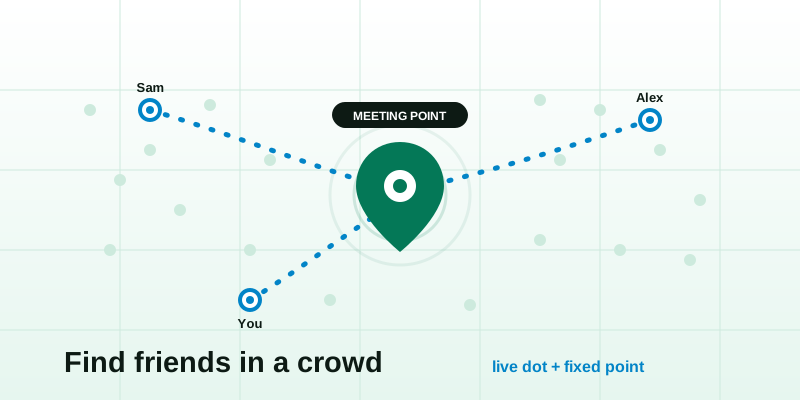
You turned around for one song, and now your group is gone — swallowed by forty thousand people, a sea of raised phones, and a bassline you can feel in your teeth. Losing your friends in a crowd is its own special panic, and it has two reliable fixes that work best together: a live location dot so people can find each other while signal holds, and a fixed meeting point for the moment the signal inevitably drops.
Why crowds break the way you normally find people
At a festival, concert, fair, theme park, or packed stadium, the two things you'd normally rely on both fail at once: you can't see over people's heads, and your phone can barely get a message out. It helps to know why, because it tells you what to set up before things get loud.
- Tens of thousands of phones share one tower. Big events overwhelm local cell capacity. Calls drop, texts queue for minutes, and "delivered" stops meaning "arrived."
- Data is the first casualty. Voice often limps along after data has effectively stopped, so a map that needs to upload your position quietly freezes.
- GPS gets confused indoors and underground. Arena concourses, big tents, and the inside of a stadium bowl block the open sky your phone needs for an accurate fix.
- Everything looks the same. "By the stage" or "near the bar" is meaningless when there are six stages and twenty bars.
So the plan isn't one magic tool. It's a primary that works when the network behaves, and a fallback that works when it doesn't.
The two-layer plan: a live dot plus a fixed fallback
Think of it as a belt and braces. The live dot is your fast path; the meeting point is your guaranteed path.
| Layer | What it is | When it shines | When it fails |
|---|---|---|---|
| Primary: live location | A shared link showing each person's dot moving in real time | Open-air areas, decent signal, actively regrouping | Dead signal, deep indoors, dying battery |
| Fallback: meeting point | One pre-agreed, named, easy-to-find spot | Always — it needs no signal once everyone knows it | Only if nobody agreed on it beforehand |
The mistake almost everyone makes is relying on the live dot alone. It's brilliant right up until the network buckles during the headline act — exactly when you most want it. Set the fallback before you need it and the panic never starts.
Set this up before you walk in (5 minutes)
Do this in the queue or on the train, while you still have full bars and a charged phone.
- Pick a meeting point and make it specific. Open the meeting point tool, drop a pin on a genuine landmark, and share it with the group. Not "the entrance" — "the big Ferris wheel," "the merch tent flagpole," "Section 112 turnstile." Choose something tall, lit, and unmovable.
- Agree a meeting time, not just a place. "If we lose each other, head to the Ferris wheel and wait" works far better with "...on the hour, every hour." A standing time means no one has to message to trigger it.
- Start a live share and send the link. Use the live location tool, tap Start, and drop the link in your group chat. Everyone opens it once on the view live location page and can reopen it any time — no app to install.
- Screenshot the meeting point. A screenshot of the pin and the spot's name survives a dead connection. The live link won't load with no data; the picture in your camera roll always will.
- Top up your battery plan. Note where the charging lockers or power banks are. A live dot is only as alive as the phone broadcasting it.
What makes a good meeting point
- Tall and visible from a distance — a tower, big sign, art installation, or tent peak.
- Lit at night — festivals run late; pick something that's still findable in the dark.
- Off to the side — not in the thickest crush near a stage front, where you'll never spot anyone.
- Unambiguous by name — only one of them on the whole site, so "meet at X" can't be misread.
The moment you actually get separated
You've lost them. Here's the order to work through, fastest first.
- Glance at the live dots. If you have any signal, open the share. Are they moving toward a stage, or standing still by a bar? A frozen dot with "last seen 8 min ago" is a clue, not the truth — treat it as their last known spot, not their current one.
- Send one short message, not five. On a congested network, one tiny text ("Ferris wheel, now") has a far better chance of getting through than a flurry. Keep it short and keep it singular.
- If nothing loads, go to the meeting point. This is the whole reason you set it. Don't stand still hoping a text lands — start walking to the agreed spot.
- Wait the agreed amount of time. Both people walking around looking for each other is how you orbit and never meet. One pattern that works: the person who realises first goes to the point and stays put; the other comes to them.
- Step to the edge to get signal back. Moving away from the densest part of the crowd, or up a slope, often restores just enough data for one dot refresh or one message to slip through.
A worked example
Four of you at a festival. You set the meeting point as the Ferris wheel, on the hour, and started a live share before the gates. During the headliner, two of you drift toward the front. The set ends, the crowd surges, and your phone shows "no internet." You can't load the map.
Because you agreed it, you don't panic — you walk to the Ferris wheel. It's 10:52, so you wait. At 11:00 the other two arrive from the opposite side, because they did the same thing. Total time lost: eight minutes. No frantic calls, no ruined night. The live dot would've been faster if the network had held — but the fixed point is what actually got you back together.
Festival, stadium, theme park: small tweaks per venue
| Venue | Best meeting point | Signal reality |
|---|---|---|
| Music festival | Ferris wheel, main flag, art installation, a named food stall | Open-air helps GPS; data dies near stages at set changes |
| Indoor concert / arena | A specific section + entrance number, or a merch stand | Weak GPS indoors; rely on the section number, not the dot |
| Stadium / sports | Your seat block and gate number | Tickets already encode the spot — use it as the fallback |
| Theme park | A landmark ride entrance or the park's central icon | Decent data; great for live dots between rides |
| Fair / street festival | A fixed structure: clock tower, bandstand, big sign | Variable — set the point and screenshot it |
Indoors, lean on the fallback; outdoors, lean on the live dot. The same two tools cover every case — you're just shifting which one leads.
Keep it private and battery-friendly
You don't need to broadcast your whereabouts to be findable, and you don't want a dead phone at midnight. A few honest habits:
- Share with your group, not the world. A live link is a private capability — only people you send it to can open it. Drop it in your group chat and nowhere else.
- Stop the share when the night's over. Once you're all home, end it. There's no reason to keep a dot live after the event.
- Mind the battery. Continuous location is genuinely power-hungry. Keep the share tab in the foreground while regrouping, then let it rest; carry a power bank; and if your phone's about to die, send the meeting point and switch the screen off. The fixed point needs no battery at all once everyone knows it.
- Don't rely on one person's phone. If only one of you is sharing and that phone dies, the whole group is blind. The meeting point is the safety net that doesn't depend on anyone's charge.
If you want a deeper look at the trade-offs, how much battery and data location sharing really uses walks through the numbers and the settings that help.
Your crowd-survival checklist
- Agree a specific, tall, named meeting point before you go in.
- Agree a standing time to meet there if separated.
- Start a live share and put the link in the group chat.
- Screenshot the meeting point so it survives a dead signal.
- If you split up: check dots, send one short message, then walk to the point.
- One person waits, one comes — never both wander.
- Carry a power bank; stop the share when you're home.
Crowds aren't the enemy — going in without a plan is. Set a fixed meeting point for the dead-signal moments, share a live location dot for everything else, and you'll spend the night watching the show instead of scanning the crowd for a familiar jacket. Set both before the first act, and "where are you?" stops being a problem you have to solve in the dark.