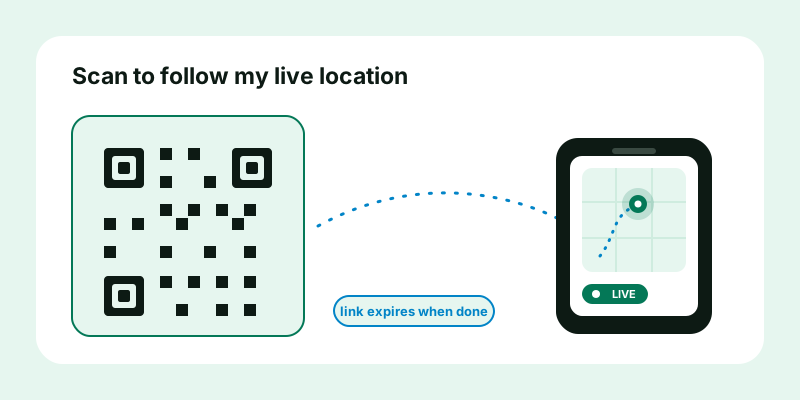
A QR code is the friendliest way to hand someone your location without typing, spelling, or texting a single link. Point a camera, tap the banner, done. But there's a subtlety almost every "location QR code" guide skips: what you encode inside the square matters far more than the square itself. Encode a frozen map pin and people get a dead spot on a map. Encode a live, expiring share link and the same printed code becomes a tappable "watch me arrive" button — one you can safely tape to a wall, a table tent, or a flyer. Here's how to do it the right way.
A QR code is just an encoded link
Strip away the mystique and a QR code is nothing more than a URL drawn as a grid of squares. When a camera reads it, the phone decodes the text inside and opens it like any other link. That single fact decides everything about how good your "scan to see my location" experience will be, because the QR itself is dumb — it only ever points at whatever you put in it.
So the real question isn't "how do I make a location QR code." It's "what link do I encode?" You have three broad choices, and they behave very differently once printed:
- Raw coordinates — a geo: URI or a maps URL with a fixed latitude and longitude. Opens a static pin. Never changes.
- A static map pin link — a shareable "here I am" snapshot from a maps app. Also fixed: it shows where you were when you made it, forever.
- A live location link — a share URL whose page updates as you move, and which you can stop or let expire. This is the one that turns a QR into something genuinely useful for meetups and events.
The mechanics of generating the code are identical for all three. The experience on the other side is night and day.
Why a live link beats a static pin in a QR
Imagine you print a QR code on a sign at a busy market and tape it to your stall. If that code contains static coordinates, it does exactly one job: it shows the fixed spot where the sign is. Useful for "find this address," useless for "find me," because you might be three aisles over restocking, parking the van, or moving the whole pop-up to a better corner.
A live location link solves the problem the static pin can't: the destination it points to is allowed to move. Scan it once and the page keeps tracking, so the same printed square works whether you're behind the table or out front waving. A few concrete wins:
- It survives you moving. Event vendors, tour guides, and food trucks relocate constantly. A live link follows; a coordinate pin doesn't.
- It's a real-time meeting aid. "Scan this and walk toward the dot" beats "we're near the fountain, sort of" for a group trying to converge in a crowd.
- One code, many people. A printed QR is read-once-per-person but points everyone at the same updating page — perfect for group meetups where you can't text twenty separate links.
- It can be turned off. When the event ends you stop the share. The printed code still scans, but it lands on an "ended" page rather than a stale pin that misleads people for weeks.
The trade-off is honesty: a live link only works while you're actively sharing. A static pin works forever but is forever wrong the moment you move. For anything where finding a person is the goal, live wins.
Static pin vs live link at a glance
| Situation | Static pin QR | Live link QR |
|---|---|---|
| "This is the venue address" | Good — fixed place | Overkill |
| "Find me at the market" | Breaks when you move | Follows you |
| Group converging in a crowd | Everyone walks to one stale spot | Everyone walks to your moving dot |
| Printed flyer left up for weeks | Silently misleads later | Expires safely; lands on "ended" |
| Recipient privacy | No follow-back | No follow-back; you control the off switch |
How to make a location QR code (step by step)
Here's the method end to end. It works for a single meetup or a printed sign, and it takes about a minute.
- Create the share link first. Open the live location tool, allow the browser location prompt, and tap Start. You'll get a private link — that link is the text you're about to encode. If you only need a one-time "here I am" rather than a moving dot, generate a snapshot with share my location instead; the QR steps are the same.
- Copy the link. Use the copy button so you grab the full URL with no stray characters.
- Turn it into a QR code. Paste the link into any QR generator (your phone's built-in option, a browser extension, or a trusted web generator). Keep it simple — a plain URL code with good contrast scans most reliably.
- Test it before you print. This is the step people skip and regret. Open a different phone's camera, scan, and confirm it opens the live page and shows your dot. Test in the lighting and at the size you'll actually use.
- Display it. Show it on a screen, drop it into a slide, or print it. Bigger and higher-contrast is better; dark code on a light background reads fastest.
The page your guests land on is the public view live location view — no app install, no sign-up on their end. They scan, the page opens, your dot moves. That's the whole loop.
A worked example: a market stall sign
Say you run a weekend craft stall that hops between two corners of the same market depending on space.
- Saturday morning you open the live location tool and start a share that's set to expire that evening.
- You generate a QR from the link and it's already printed on your "Find us — scan to see our spot" A5 sign.
- A customer at the entrance scans it, sees your dot near the north corner, and walks straight over — even after you've moved from where you set up an hour earlier.
- At close, the share expires on its own. Sunday you start a fresh share; the same printed sign works again because the code points at your share, and your share is what changed.
One printed sign, reusable every weekend, always current. That's the payoff of encoding a live link instead of coordinates.
The privacy point: why an expiring link makes a printed QR safe
Printing your location and leaving it up in public sounds alarming, and with the wrong link it would be. The thing that makes it safe is the kind of link underneath: a capability link that expires.
A few principles worth understanding before you tape a code to anything:
- The link is the key. A live share link works because it's an unguessable address, not because it checks who's asking. Anyone who scans it can view — which is exactly what you want for an open event, and exactly why you should never print a link you intend to keep private.
- Expiry is your safety net. Because a posted QR can be photographed and re-shared, you should treat it as public for as long as the share is live. An auto-expiring link means that even if the printed code outlives the event, it stops working — scanning it later reveals nothing about where you are now.
- A QR doesn't add risk; the link sets it. The square is just an opener. The privacy of the whole thing is decided by whether the underlying share is live, who can reach it, and when it ends — not by the QR.
- It's one-directional. People who scan see your dot. They don't get to share back, and scanning doesn't reveal who they are to you. It's broadcast, not a two-way connection.
So the safe recipe for a printed, public location QR is short: encode a live share, set a sensible expiry, and stop it manually the moment the event is over. For anything you'd be uncomfortable having photographed by a stranger, don't put it on a wall — send the link privately to named people instead.
When not to use a QR for your location
- One specific person, privately. Just text them the link. A QR adds a scan step with no benefit and risks the code being seen by others.
- A sensitive or home address. Don't print where you live and leave it on display, even briefly.
- A code with no expiry. If your share can't auto-end, a printed code becomes a permanent open door. Prefer links that expire.
Troubleshooting: when the scan doesn't work
Most QR failures are mundane and fixable before you commit to printing.
| Symptom | Likely cause | Fix |
|---|---|---|
| Camera won't recognise the code | Too small, low contrast, or glare | Print bigger; dark-on-light; matte surface |
| Opens a page but no dot | The share has stopped or expired | Start a fresh share and regenerate the code |
| Opens but dot won't move | Your phone paused background updates | Keep the share tab in front; charge the phone |
| Some phones scan, others don't | Damaged or over-styled QR art | Use a plain code with a clean quiet zone (margin) |
If the page opens but your dot is frozen or absent, the problem is the share, not the QR — and that's almost always a phone setting. Our walkthrough on why live location stops updating and how to fix it covers the precise-location, battery-saver, and background-refresh toggles that cause it.
Make your scannable location link
A location QR code is only as good as the link inside it. Encode a static pin and you've handed people a spot on a map; encode a live, expiring share and you've handed them a "walk toward me" button that works even as you move and quietly switches itself off when the day's done. Open the live location tool, start a share, set an expiry, and turn the link into a QR — then test the scan once before you print. For a one-time pin instead of a moving dot, use share my location, and when the goal is a group all converging on one place, point everyone at the same live view and let them watch each other arrive.