If you've ever stood on a street corner wondering whether to drop a WhatsApp live location, fire up Google Maps, or just send someone a link, you've hit a genuinely tricky question. All three "share your location," but they're not the same thing — they differ in how long they run, what they reveal about you, and whether the person on the other end even needs the right app. This is a fair, head-to-head comparison so you can pick the smallest tool that does the job, and over-share a little less every time.
The three ways people share, in one minute
Before comparing details, it helps to name what each option actually is, because they solve slightly different problems.
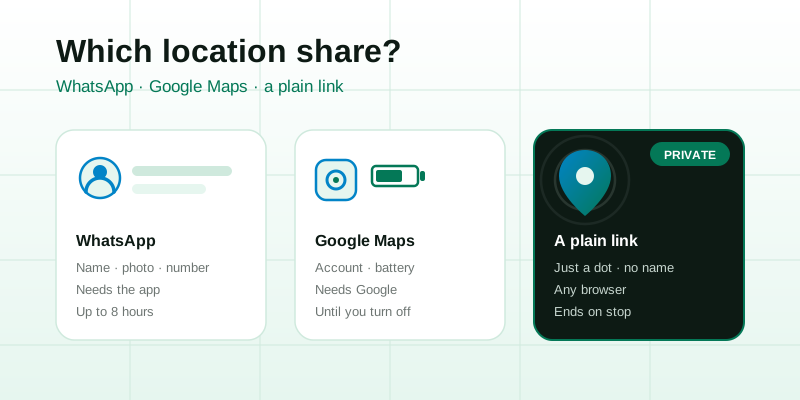
- WhatsApp live location — a real-time stream inside a chat. You pick a duration (15 minutes, 1 hour, or 8 hours), and the people in that conversation watch your dot move until the timer runs out. It rides on top of your WhatsApp account, so it's tied to your name, photo, and phone number.
- Google Maps location sharing — also real-time, but built around your Google account. You can share for a set period or, notably, until you turn it off, with chosen contacts who also use Google. It can surface extras like your device battery level and arrival times.
- A no-account browser link — you open a page, tap start, and get an unguessable web link. Anyone you send it to opens it in any browser and watches you on a map. No app to install, no account on either side, and it ends when you stop it or when the timer expires. That's the model behind the live location tool.
All three can show a moving dot. The differences are in the fine print — and the fine print is where your privacy lives.
Side-by-side: what each one reveals
Here's the honest comparison. The goal isn't to declare a universal winner — each tool fits a different moment — but to make the trade-offs visible.
| What matters | Google Maps | No-account link | |
|---|---|---|---|
| Recipient needs an app/account | Yes — WhatsApp | Usually a Google account | No — any browser |
| You need an account | Yes | Yes (Google) | No |
| Reveals your name & photo | Yes (your profile) | Yes (your Google profile) | No — just a dot |
| Reveals your phone number | Yes | No | No |
| Can show battery level | No | Yes | No |
| Sharing duration | 15 min / 1 h / 8 h | Set period or until turned off | Timed, ends on stop/expiry |
| "Until you turn it off" option | No | Yes | No (by design) |
| Tied to a long-lived identity | Yes | Yes | No |
Read down the "reveals" rows and a pattern appears: the two account-based tools hand over a lot of context about who you are alongside where you are. A plain link hands over only the where, for only as long as you allow.
Sharing duration: the detail that bites people
Duration sounds boring, but it's the single setting most likely to cause an accidental over-share. The risk isn't starting a share — it's forgetting to stop one.
WhatsApp keeps this safe-by-default: every live share has a hard limit, and 8 hours is the longest you can pick. Even if you forget, it ends on its own that day. Google Maps is the most flexible and, for the same reason, the easiest to leave running — its "until you turn this off" option means a share you set up for a single car trip can quietly broadcast for weeks if you never revisit the setting. A no-account link sits closest to WhatsApp's model: it's temporary by design, ending the moment you tap stop, close the tab, or hit the expiry you chose.
Whichever you use, the habit that matters is the same: pick the shortest window that covers the task, and treat "until I turn it off" as a setting to avoid rather than a convenience. If you want a deeper walkthrough of bounded shares and clean stops, the guide on how to share your live location safely covers it step by step.
Does the recipient need an app?
This is where the three options diverge most, and it's the question that decides which one is even usable in the moment.
- WhatsApp only works if the other person also has WhatsApp and is in the chat. Great for friends and family who already live in the app; useless for a delivery driver, a new date, or a hotel front desk who don't have your number saved.
- Google Maps generally expects the recipient to have a Google account to see your shared location on their own map. It can fall back to a link, but the smooth experience assumes both sides are in Google's ecosystem.
- A no-account link has no such requirement. You send a URL; they tap it; a map opens in whatever browser they already have. Nobody installs anything. That's exactly what the view live location page is for — the recipient just watches your dot, no sign-up, no friction.
If you ever share location with people outside your usual circle — a contractor, a carpool you just joined, someone you met an hour ago — the "no app needed" property stops being a nicety and becomes the whole point.
Privacy: what you're really trading
Every location share is a small disclosure. The fair question is how much you disclose, and to whom, for how long. Account-based tools bundle your location with a durable identity — name, profile photo, phone number, and an entry in a service's account graph that persists long after the share ends. That bundling is convenient when you're sharing with people you'd happily share all of that with anyway. It's a poor fit when you only meant to say "here's my dot for the next 20 minutes."
A no-account link inverts the default. Because there's no profile attached, the recipient sees a position on a map and not much else — no name, no photo, no number. Because the link is an unguessable capability (holding it is the only way to see the share), nothing is listed or searchable; the only people who can watch are the ones you handed the link to. And because the share is ephemeral, when it ends there's no lingering "currently sharing with…" relationship to audit later. If you want the full reasoning on capability links and ephemeral sharing, see is live location sharing safe.
None of this makes account-based tools "bad" — it makes them identity-rich. The right instinct is to match the disclosure to the moment, and to default to the leaner share when you're not sure.
Which should you actually use?
Here's a simple way to choose, by who's on the other end:
- Sharing with close family or a friend who already has WhatsApp? WhatsApp is fine and frictionless — just pick the shortest duration and let it expire. For families specifically, the trade-offs of apps vs links are worth reading in location sharing for families.
- Already deep in Google's ecosystem and want battery and arrival info for trusted contacts? Google Maps gives you the most data — just steer clear of the "until you turn it off" setting.
- Sharing with someone outside your circle, or who shouldn't get your name and number? A no-account link is the clear, fair winner: nothing to install, no identity attached, and it ends when you say so. Start one with the live location tool.
- Only need to send one fixed spot, not a moving dot? Skip live sharing entirely and send a single pin with share my location, or agree on a spot with meeting point.
The bottom line
There's no single "best" location share — there's the right one for who's watching and for how long. WhatsApp wins on convenience inside your existing chats. Google Maps wins on rich data for people already in your Google world. And when you want to share where without handing over who — to anyone, on any browser, for exactly as long as you choose — a no-account link is the privacy-first pick, and the only one that asks nothing of the recipient.
Ready to try the leanest option? Open the live location tool, start a share, and send the link — the other person watches you on the view live location page with no app and no account. For the many times someone just needs to find one spot, a single static location link is smaller still. You can read more about how we handle data on our privacy page, or browse the rest of the blog for more on sharing safely.